 S2Nodes
Unlimited PDFs, side by side
Add files, whole folders (with sub-folders) or drag and drop. Split view puts the notice next to the Act.
 v1.1.0 · early release →
SideNotes is a desktop workspace for reading many PDFs side by side, pulling passages onto a free-form notes board and linking documents together. It works offline, and your documents never leave your computer.
7-day free trial · lifetime licence ₹9,999 · Apple Silicon Mac & Windows 64-bit · first-open steps
Notices, Acts, rules, circulars, contracts, judgments. Open them all, cut out what matters and see how it connects.
Add files, whole folders (with sub-folders) or drag and drop. Split view puts the notice next to the Act.
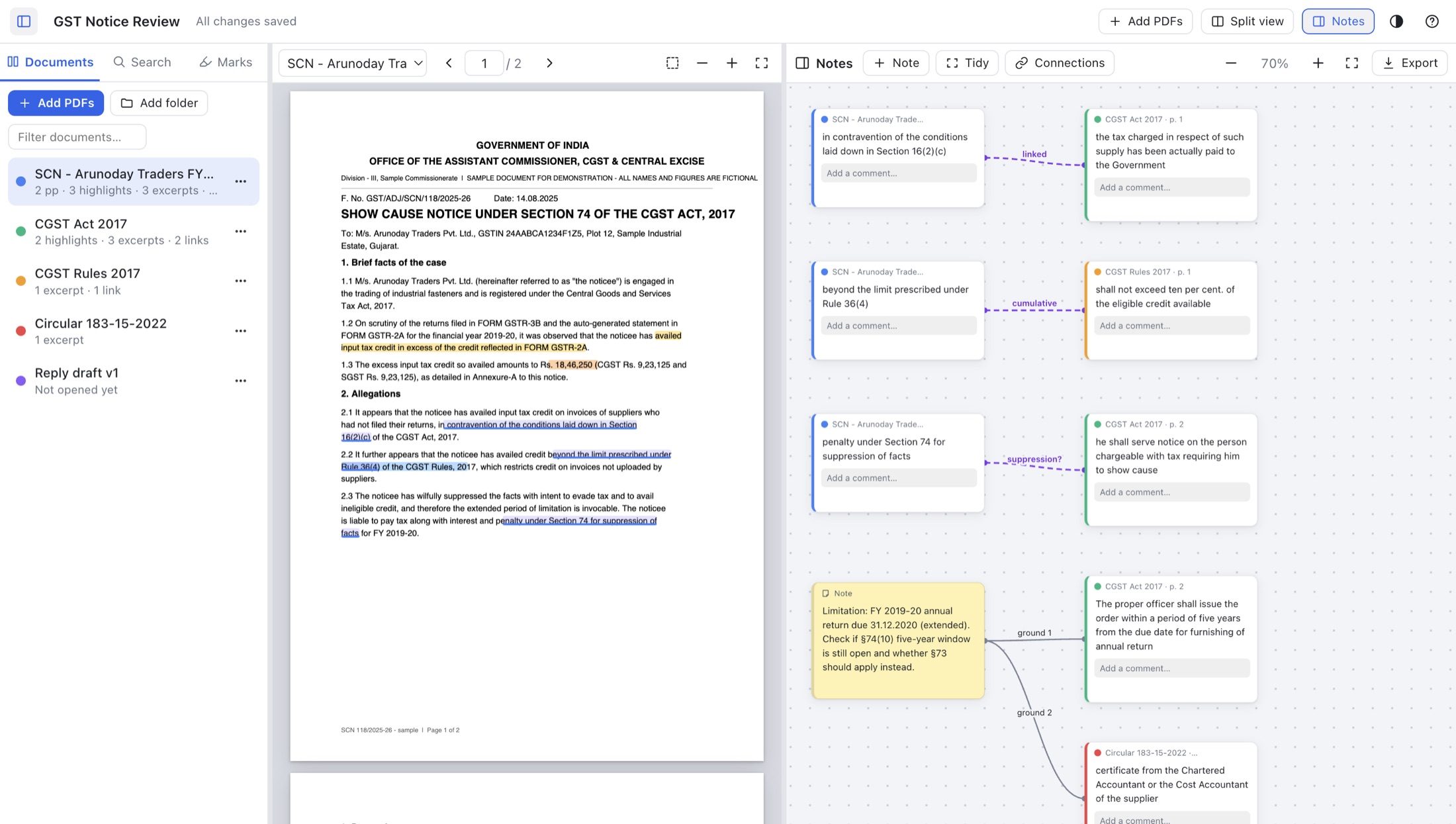
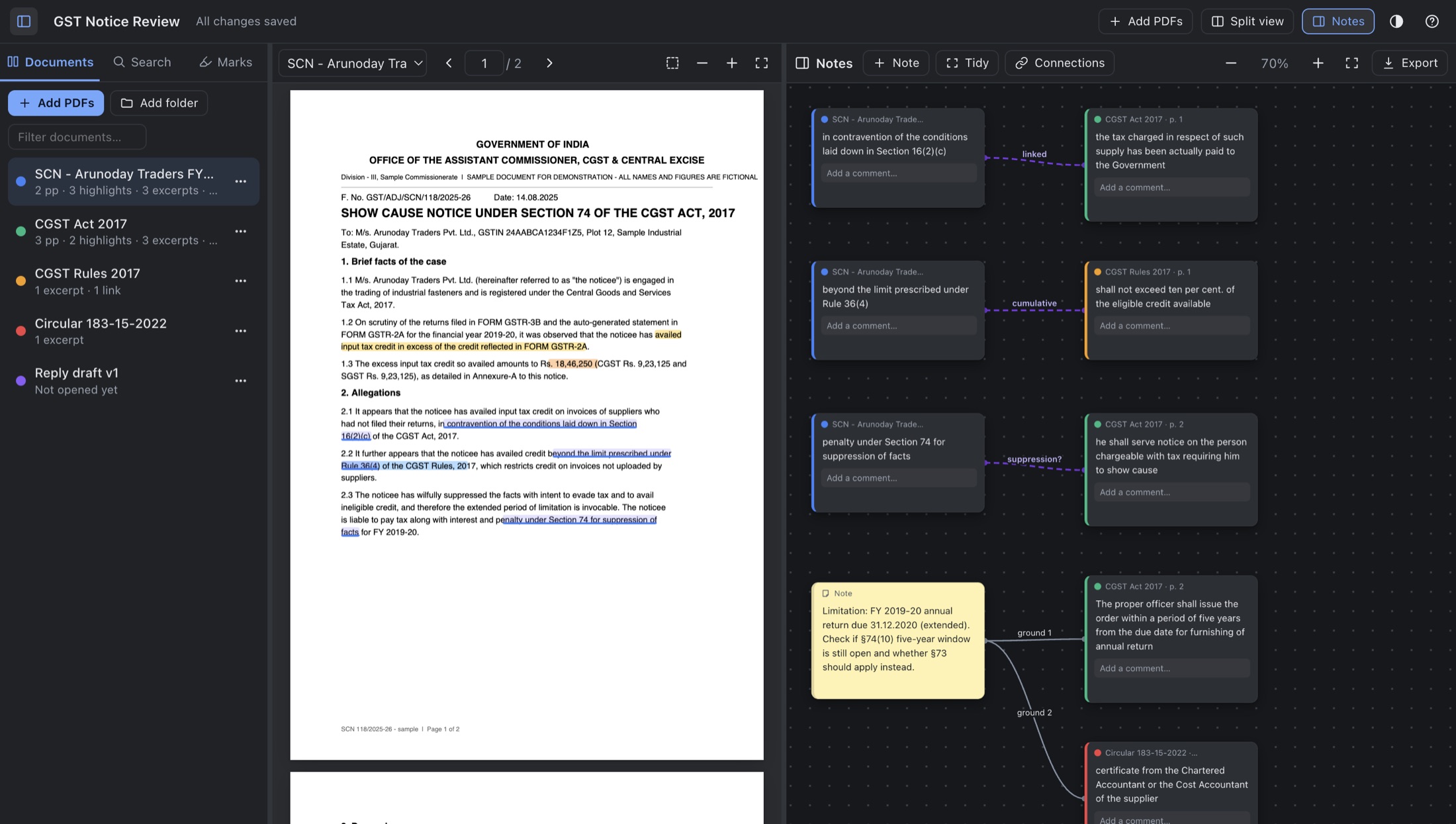
Select text and send it to the board. Each card remembers its PDF and page, and one click takes you back.
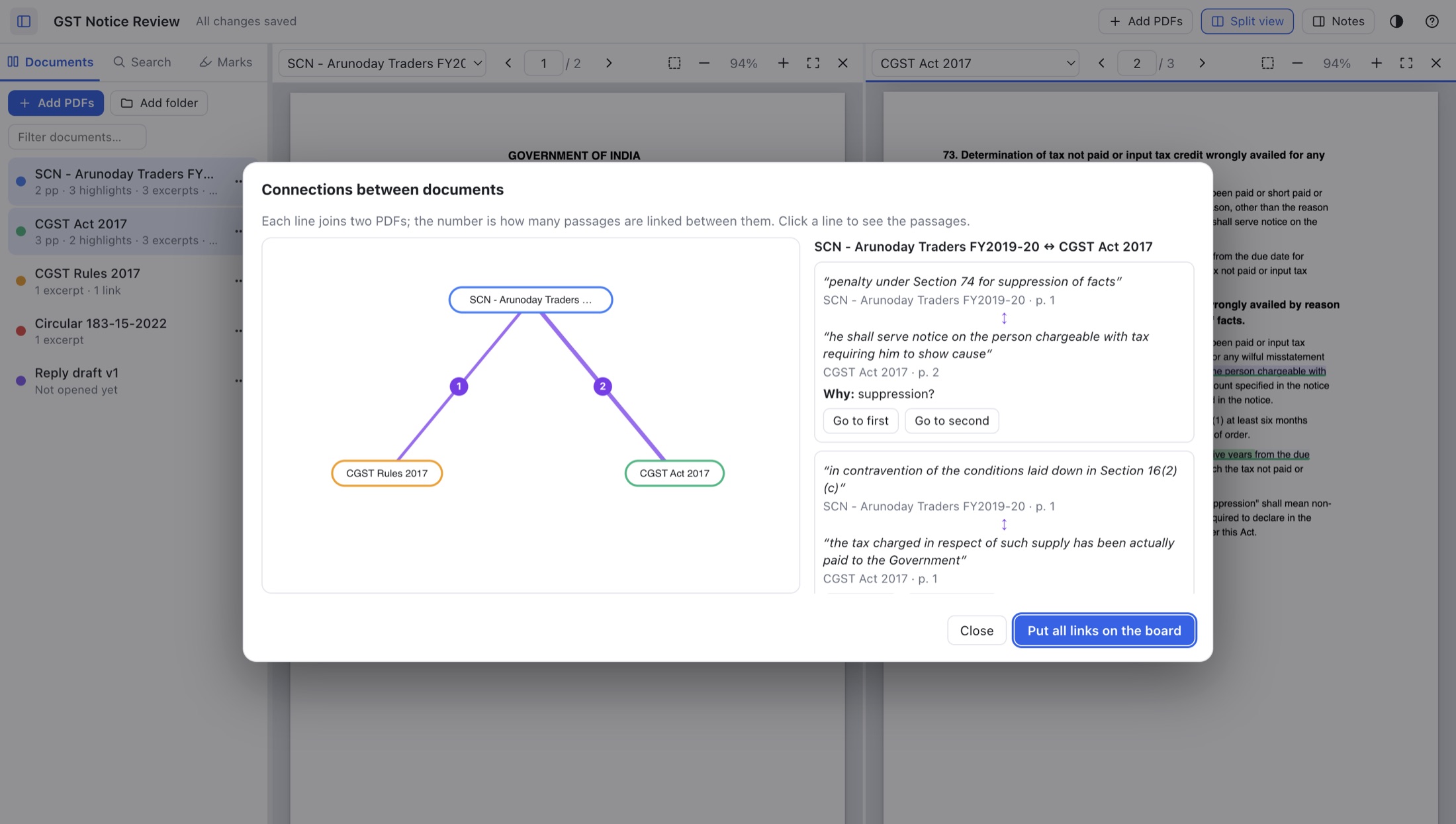
Link a passage in one PDF to a passage in another. A Connections map shows which documents talk to each other.
Drag a box around a table, stamp or scanned page and it lands on the board as an image.
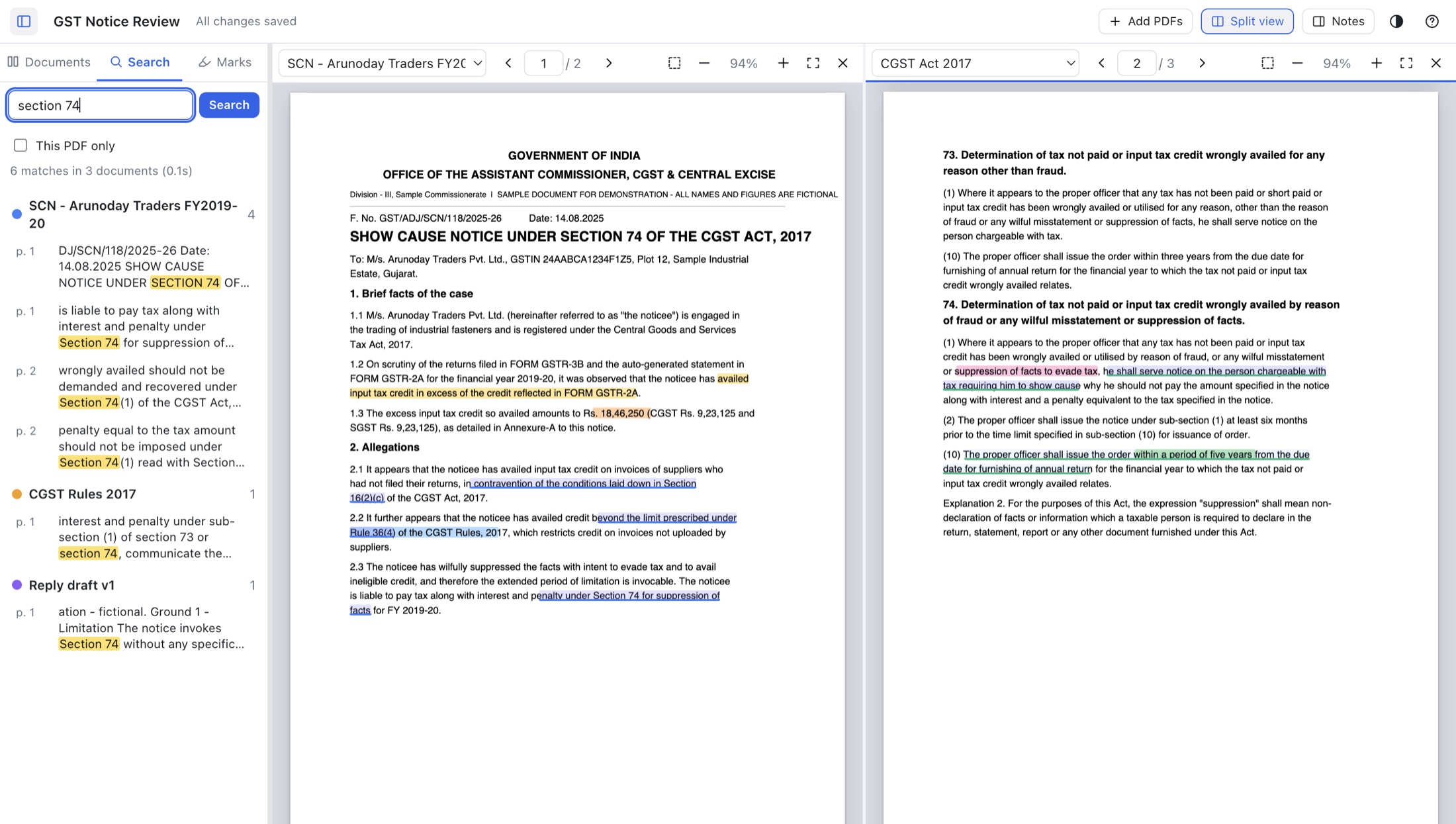
One search across every PDF, or This PDF only. ⌘/Ctrl F finds inside the open file.
Word, PDF, Markdown, HTML and an .svg connections map. Every excerpt carries its PDF name and page.
Cards never overlap. Connect them with labelled wires, then press Tidy for neat columns.
Match your computer, choose sepia or dark PDF pages for night reading, and pick a dotted, grid or plain board.
The project lives beside its PDFs. Copy the folder to another computer and everything re-links itself.
Every image below is a real screenshot of SideNotes 1.0.0. Pick a view, or take the full guided tour.
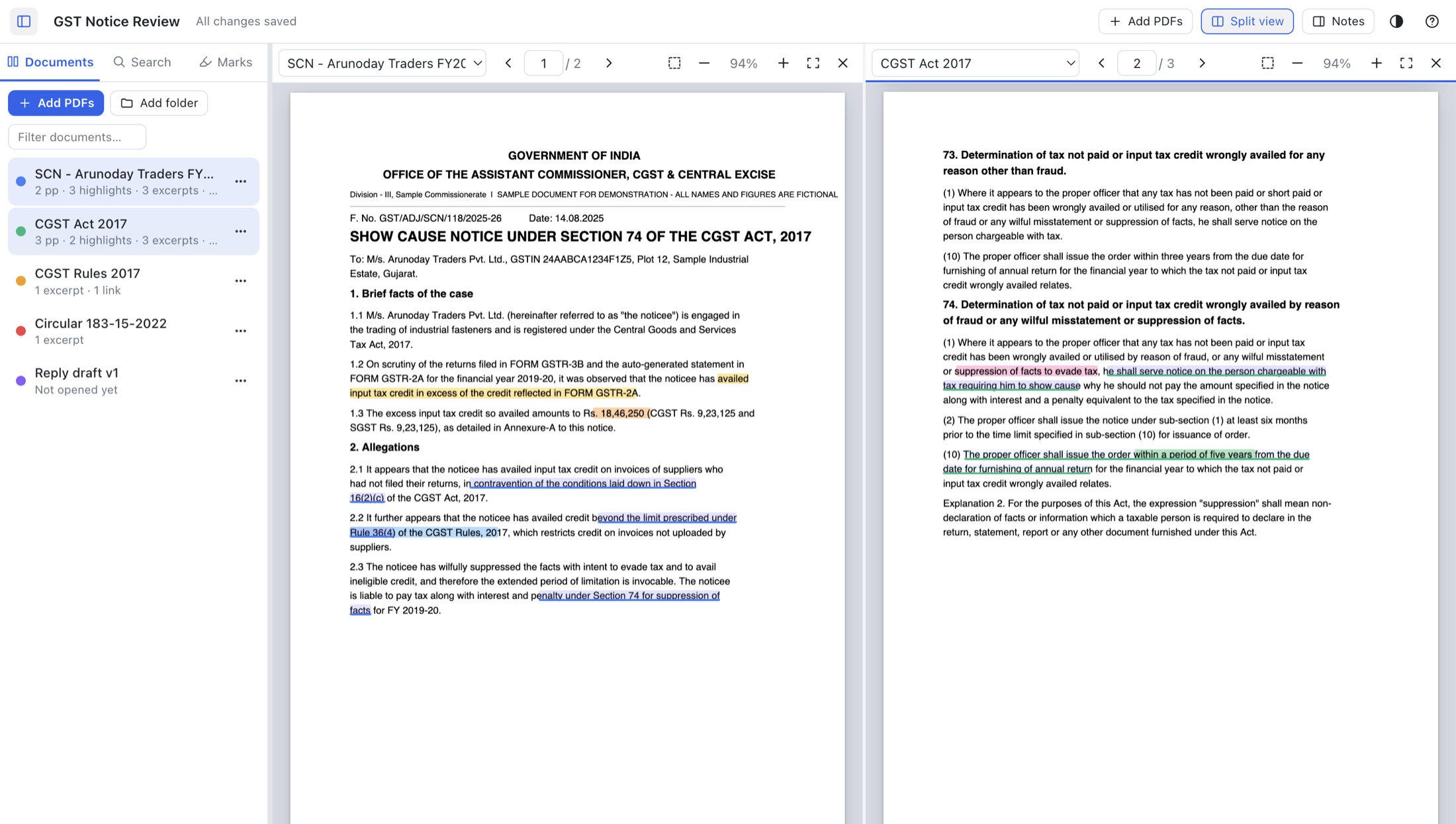
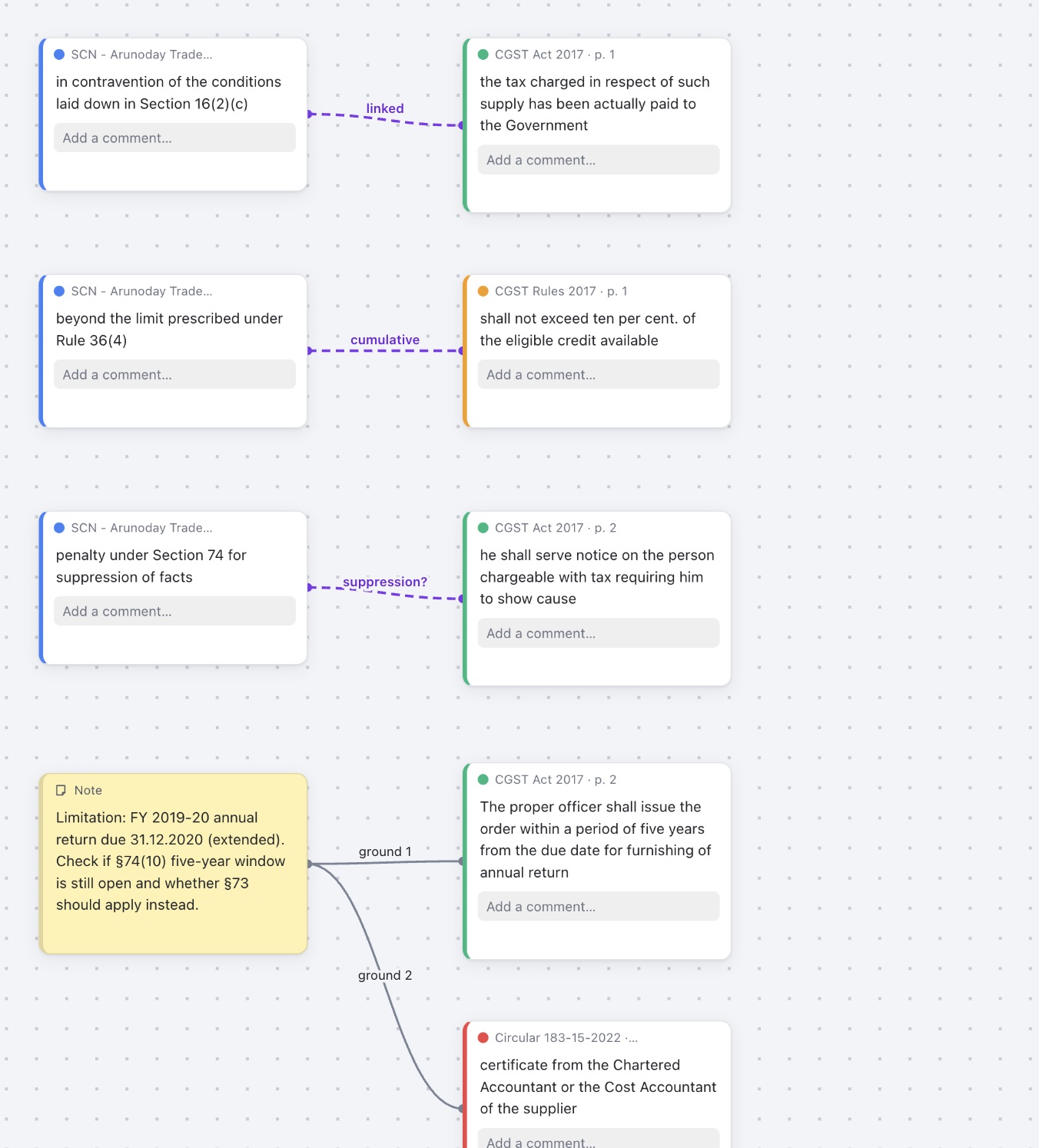
A 40-page notice cites a dozen sections, three rules and two circulars. This is how SideNotes handles it.
Client notices, financials and contracts are confidential, so SideNotes was built with no cloud at all.
.sidenotes project file.Start with a free 7-day trial. When you're ready, a lifetime licence is ₹9,999 (or less with a coupon) and covers two computers. Enter a few details and we'll email you the download link.
This is the first public release of SideNotes. It works well for daily use, but you will probably find bugs. Keep your original PDFs backed up as usual (SideNotes never changes them), and please report what breaks so it can be fixed in the next update.
7-day free trial, then your licence key. We email you two licence keys with the download: one for your office computer and one for your personal computer. Enter a key in Help → Licence… (internet needed once).
The app is not code-signed yet. Signing with Apple and Microsoft is in progress. Until then, Mac and Windows show a warning the first time you open it. The steps below get past it once, and you won't see it again.
xattr -cr /Applications/SideNotes.app && codesign --force --deep --sign - /Applications/SideNotes.app
No Terminal? Right-click the app, choose Open, then Open again. If macOS says the app is "damaged", use the command above.
Tip: right-click SideNotes.exe and choose Pin to Start to keep it handy.
Stuck on a warning? See the step-by-step install guide with pictures. · Intel Mac and Linux builds are not available yet.
SideNotes isn't signed with a paid Apple developer certificate yet. That's in progress for a future update. The warning comes from Gatekeeper and does not mean anything is wrong with the file. After moving the app to Applications, run this once in Terminal:
xattr -cr /Applications/SideNotes.app && codesign --force --deep --sign - /Applications/SideNotes.appOr right-click the app, choose Open, then Open again.
That's SmartScreen, which warns about apps that aren't code-signed yet. Click More info → Run anyway. You only need to do this the first time.
Keep the .sidenotes project file in the same folder as its PDFs (SideNotes offers this when you add your first PDFs). Then copy the whole folder by USB, OneDrive or iCloud and double-click the project file on the other computer. Everything re-links automatically.
For a guaranteed-complete copy, use File → Package Project for Another Computer…. It writes one tidy folder containing the project and all its PDFs.
SideNotes runs as a 7-day free trial on each computer. With the download we email you two licence keys: one for your office computer and one for your personal computer. Each key works on one computer.
To activate: open Help → Licence…, paste a key and click Activate (internet needed once; after that it works offline). Changing computers? On the old one, choose Help → Licence… → Release this computer, then activate on the new one. If the old computer is gone, reply to your download email and we'll reset the key.
No. Your documents never leave your computer, and there is no account or analytics. Your PDFs are only read, never modified.
SideNotes contacts s2nodes.com only to activate your licence key (once), re-check it about once a week, and check for updates. It sends the key, the app version, your computer's name and an anonymous computer ID, never your files.
Scanned pages have no text layer, so text selection and search won't work on them (OCR isn't included yet). Use the Area tool to send any region to the board as a picture.
No. They're stored in the project so your originals stay untouched. If you need them baked in, use Export → Current PDF with my highlights to make a copy.
SideNotes auto-saves and has Undo for deletes, and it never edits your PDFs, so your source documents are safe. If you hit a bug, use the bug report form and include what you were doing. Fixes will ship in the next update on this page.
Offline, for Mac and Windows. Try it free for 7 days.